
If OBS is throwing failed to open nvenc codec function not implemented on Linux, your GPU almost certainly works fine — it’s the NVIDIA driver and the kernel module talking past each other. I’ve hit this exact error on two different distros after routine kernel updates, and both times the actual GPU was never the problem. Let’s sort out what’s actually broken.
Quick Answer
- Run
nvidia-smifirst — if that fails too, your NVIDIA driver isn’t loaded properly and that’s the real issue, not OBS - Check that your installed NVIDIA driver version actually supports NVENC for your specific GPU generation
- Reinstall or rebuild the NVIDIA kernel module after any kernel update — this is the single most common cause
- Confirm you’re not accidentally running OBS through Flatpak without proper NVIDIA driver passthrough, since that’s a separate and very common trap on Linux
If nvidia-smi works fine and your driver version checks out, keep reading — the cause is somewhere further down this list.
Why This Actually Happens
“Function not implemented” is a fairly literal Linux kernel error — it means the NVENC encoding function OBS is trying to call isn’t available through the driver interface OBS is talking to, even though the hardware itself supports it. So the GPU can do the thing. The software path to it is broken somewhere.
Here’s where that breakdown actually comes from in practice:
1. Kernel updated, NVIDIA driver module didn’t rebuild. This is by far the most common cause on Linux, and it bites people constantly because it’s silent — your system boots fine, your desktop works, everything looks normal, and then OBS specifically fails because the NVIDIA kernel module (nvidia.ko) is mismatched against the running kernel version. DKMS is supposed to handle this automatically, but it doesn’t always trigger correctly, especially after unattended kernel upgrades.
2. NVENC isn’t supported on your specific GPU, or your driver branch dropped support for it. Older GPUs (pre-Kepler, and some early Kepler cards) don’t have NVENC hardware at all. And separately, NVIDIA occasionally restructures driver branches in ways that change which GPU generations get NVENC support in a given driver version — so a driver update can technically remove NVENC capability for older cards even though the card itself never changed.
3. Running OBS in a Flatpak or Snap sandbox without proper NVIDIA driver access. This one’s genuinely sneaky. Flatpak OBS needs the NVIDIA driver extension installed separately (org.freedesktop.Platform.GL.nvidia), matched to your exact driver version. If that extension is missing or mismatched, OBS inside the sandbox can’t see the real NVENC interface even though your system-level driver is fine.
4. Multiple GPU setup (laptop with integrated + NVIDIA, or desktop with two GPUs) where OBS is bound to the wrong one. On laptops with NVIDIA Optimus, OBS sometimes launches under the Intel/AMD integrated GPU context by default, and the NVENC call fails because it’s not actually talking to the NVIDIA GPU at all.
One cause that catches people off guard: a stale nvidia-uvm or related kernel module loaded from before a driver reinstall. If you upgraded your NVIDIA driver without a clean reboot or without removing old DKMS-built modules first, you can end up with a half-old, half-new module set that loads without erroring but doesn’t actually function correctly for NVENC specifically — everything else (display output, even basic CUDA) can work fine while NVENC alone fails, which makes it look like an OBS-specific bug when it’s a driver-state problem.
Common Scenarios
- Right after a distro kernel update (Ubuntu, Fedora, Arch, Pop!_OS — all of them, doesn’t matter which)
- OBS installed via Flatpak on a fresh install, working fine for webcam capture but failing specifically when NVENC encoding is selected
- Laptops with NVIDIA Optimus / hybrid graphics, especially ones using
prime-selector similar GPU-switching tools - After switching from the open-source Nouveau driver to the proprietary NVIDIA driver, if the switch wasn’t fully clean
- Multi-GPU desktop setups (NVIDIA + AMD, or two NVIDIA cards) where the wrong card gets bound to the encoding session
Technical Comparison
| Cause | Quick test | Fix difficulty |
|---|---|---|
| Driver/kernel mismatch after update | nvidia-smi fails or shows mismatched version | Easy-medium |
| GPU doesn’t support NVENC | Check GPU generation against NVIDIA’s NVENC support list | Not fixable — hardware limit |
| Flatpak missing driver extension | flatpak list doesn’t show matching nvidia GL extension | Easy |
| Wrong GPU bound (Optimus/multi-GPU) | nvidia-smi shows GPU present, but OBS still fails | Medium |
| Stale kernel modules from dirty driver upgrade | `lsmod | grep nvidia` shows unexpected module versions |
Worth saying plainly: if your GPU genuinely doesn’t have NVENC hardware, none of these fixes will help, and you should just use x264 software encoding instead. No shame in it, it’s just a different category of problem.
Step-by-Step Fixes
Step 1: Confirm the NVIDIA driver itself is working
Before touching OBS at all, run:
bash
nvidia-smiIf this fails, errors, or doesn’t list your GPU, your NVIDIA driver isn’t loaded correctly at the system level, and OBS was never going to work regardless of any OBS-specific setting. Fix the driver first.
Step 2: Check your driver version and rebuild kernel modules if needed
bash
nvidia-smi --query-gpu=driver_version --format=csvThen check if DKMS modules match your current kernel:
bash
dkms statusIf you see anything stale or mismatched against uname -r, rebuild:
bash
sudo dkms autoinstall
sudo reboot
A full reboot here matters — don’t skip it, half these fixes only take effect after the kernel module reloads cleanly at boot.
Step 3: Verify NVENC support for your GPU specifically
Check your GPU model against NVIDIA’s published NVENC support matrix for your driver branch. If you’re on a GPU older than the Kepler/Maxwell generation, or running a very old proprietary driver branch, NVENC might genuinely not be available, and this isn’t an OBS bug at all.
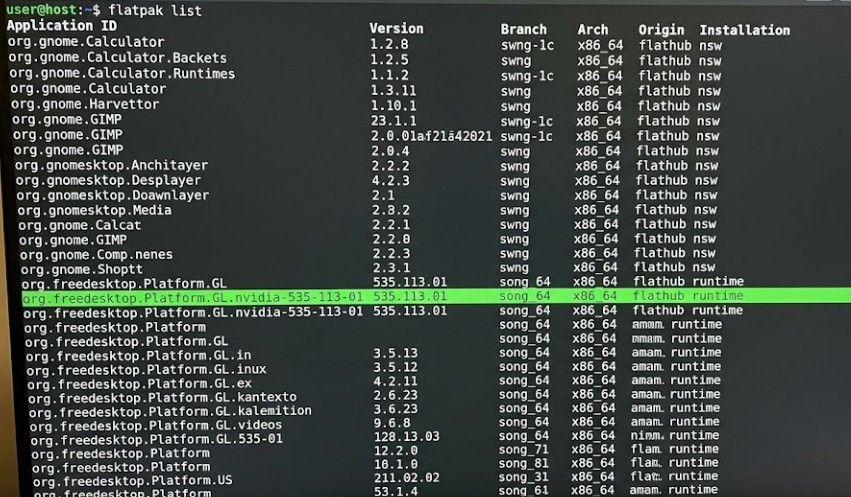
Step 4: If using Flatpak, install the matching NVIDIA GL extension
bash
flatpak list | grep nvidiaIf nothing shows up, or the version doesn’t match your system driver version exactly:
bash
flatpak install flathub org.freedesktop.Platform.GL.nvidia-<your-driver-version>This is finicky — the Flatpak extension version has to match your actual installed NVIDIA driver version closely, and a mismatch here causes exactly this NVENC error even when everything else looks fine.
Image: Terminal showing flatpak list output with the nvidia GL extension version highlighted
Step 5: For Optimus/hybrid laptops, force OBS onto the NVIDIA GPU
Try launching OBS with the NVIDIA GPU explicitly forced:
bash
__NV_PRIME_RENDER_OFFLOAD=1 __GLX_VENDOR_LIBRARY_NAME=nvidia obsIf you’re using prime-select, also confirm you’re in the correct mode (nvidia or on-demand, not intel):
bash
prime-select queryStep 6: Restart OBS, and the underlying NVIDIA services, fully
Close OBS completely, and if you’re testing this seriously, log out and back in (or reboot) rather than just relaunching the app — some of the driver-level state doesn’t refresh on a simple app restart.
What Actually Worked For Me
So this one happened to me right after a routine Ubuntu kernel update that I genuinely didn’t think twice about at the time — it was one of those background updates that just installs and you don’t notice until something specific breaks.
First thing I tried was reinstalling OBS entirely, because my gut reaction was “something about the OBS package itself is broken.” Total waste of effort, in hindsight — same error, immediately, right after reinstall. Should’ve checked the driver first, but I didn’t, and that’s a mistake I’ve made more than once with GPU-related errors specifically.
Ran nvidia-smi out of mostly habit rather than a structured process, and it actually worked fine, which threw me off because I’d half-expected it to fail too. GPU was detected, driver version looked normal. So the driver wasn’t fully broken, just NVENC specifically.
What actually fixed it was running dkms status, which showed the NVIDIA module had built against an older kernel version than the one I was currently running — the kernel update had gone through, but DKMS hadn’t rebuilt the module against the new kernel for whatever reason. Ran sudo dkms autoinstall followed by a full reboot, and NVENC came back immediately in OBS with zero other changes.
Not a particularly dramatic fix once I found it, but it took longer than it should have because I went after OBS itself first instead of checking the driver state, which is honestly the more obvious first move and I just didn’t take it.
Advanced Fixes and Edge Cases
Checking dmesg and journalctl for the actual kernel-level error. Run dmesg | grep -i nvidia or journalctl -k | grep -i nvidia right after a failed OBS NVENC attempt. This often shows a more specific underlying error than what OBS itself reports — sometimes a module load failure, sometimes a Xid error code that points to a specific GPU fault rather than a generic driver mismatch.
Secure Boot blocking unsigned kernel modules. If Secure Boot is enabled and your NVIDIA driver kernel modules aren’t signed (common with manually installed .run driver packages rather than distro-packaged ones), the module can silently fail to load certain functions, NVENC included, while the base driver still partially works. Check with mokutil --sb-state, and if Secure Boot is on, either sign the modules properly through your distro’s process or disable Secure Boot if that’s acceptable for your setup.
Checking actual NVENC session limits. Consumer NVIDIA GPUs have historically capped the number of simultaneous NVENC encoding sessions (this has loosened in recent driver versions for certain GPU generations, but it’s still worth checking). If another application — a game streaming overlay, another instance of OBS, a remote desktop tool using hardware encoding — already has an NVENC session open, a second request can fail with an error that looks similar to this one. Close other GPU-encoding applications and retest.
Xorg vs Wayland session differences. On some distros, NVIDIA’s NVENC behavior under Wayland sessions has had rough edges that don’t show up under Xorg, particularly on older driver versions. If you’re on Wayland and hitting this consistently with an otherwise healthy-looking driver setup, logging into an Xorg session as a test is a reasonable diagnostic step, even if it’s not where you want to end up long-term.
Prevention Tips
- After any kernel update, get in the habit of running
nvidia-smionce before you actually need OBS, not in the middle of a stream setup - If you’re on DKMS, periodically check
dkms statusmatchesuname -r, especially after distro upgrades that bump multiple kernel versions at once - Keep Flatpak NVIDIA GL extensions in sync with your system driver version — check this any time you update your NVIDIA driver, not just when something breaks
- On Optimus laptops, confirm your GPU mode (
prime-select queryor equivalent) before a stream or recording session, not during it - Avoid mixing manually installed
.runNVIDIA drivers with your distro’s package manager-installed drivers — pick one method and stick with it to avoid module conflicts down the line
FAQ
Does this mean my GPU is broken? No, almost certainly not. This is a software/driver state issue in the vast majority of cases, not a hardware fault.
Will switching to x264 software encoding fix it? Yes, immediately, as a workaround — but it shifts encoding load onto your CPU, so it’s not a real fix if you actually need hardware encoding for performance reasons. Treat it as a temporary stopgap.
Does this happen on Windows too? Rarely, and usually for a different underlying reason (driver corruption rather than kernel module mismatch) — this specific error message and root cause is largely a Linux-specific issue tied to kernel module management.
Why did this start happening after I didn’t even update OBS? Because the cause is almost never OBS itself — it’s the kernel and NVIDIA driver state underneath it. OBS just happens to be the first thing that surfaces it since NVENC is something a lot of other apps don’t actively use.
Is reinstalling the NVIDIA driver from scratch a good fix? It can work, but it’s a bigger hammer than usually necessary. Try dkms autoinstall and a reboot first — a full driver reinstall is more disruptive and not where I’d start.
Editor’s Opinion
classic case of an error message blaming the wrong layer. OBS says NVENC failed, so people uninstall and reinstall OBS a dozen times, when really it’s the kernel module underneath that needs rebuilding. run nvidia-smi and dkms status before you touch OBS itself at all — would’ve saved me a reinstall I genuinely didn’t need to do.