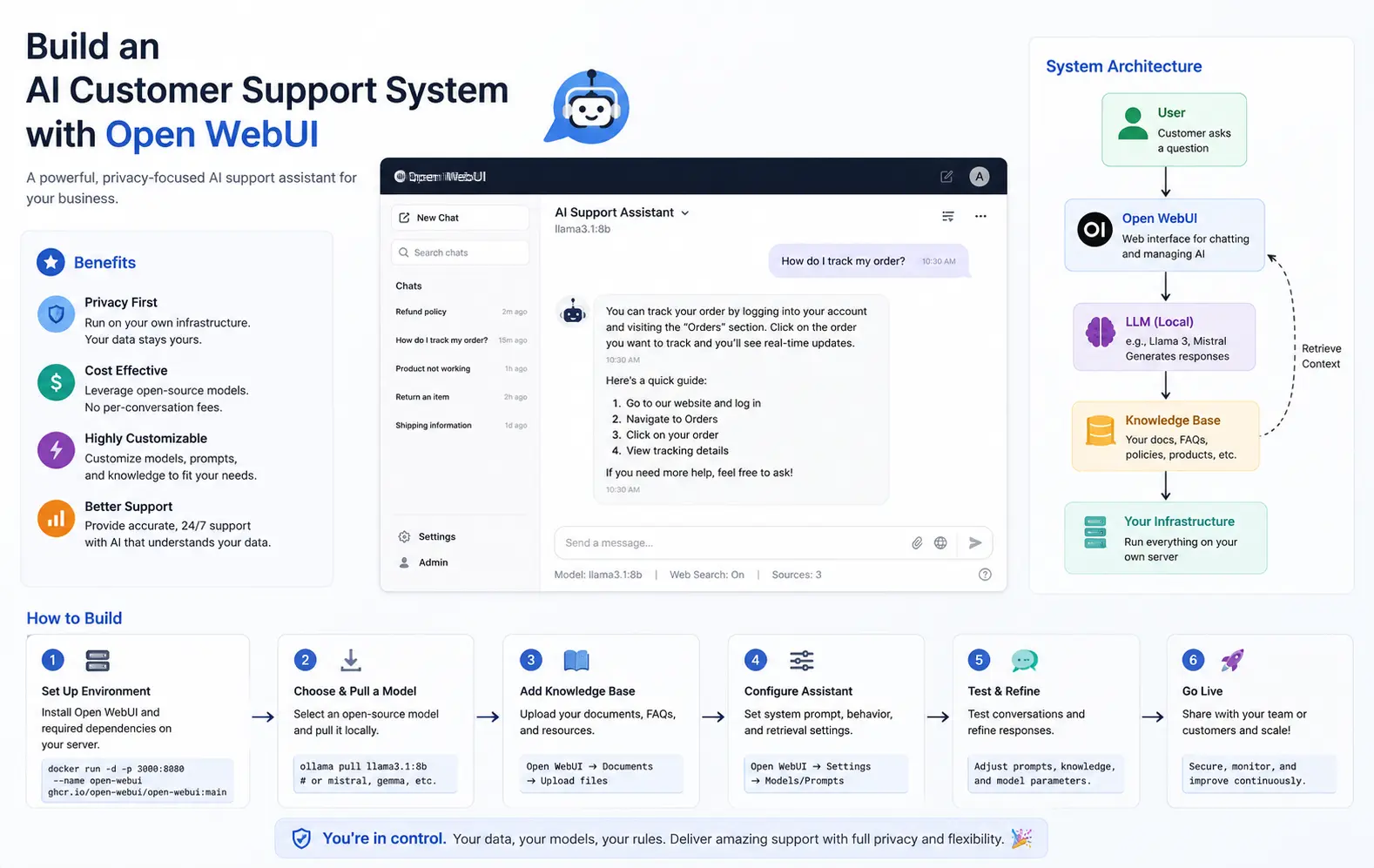
I set up my first Open WebUI customer support system expecting a weekend project, and instead spent three days fighting a knowledge base that kept returning answers from the wrong product line. That’s the thing nobody tells you going in: the chat interface part is easy, the part where it actually knows your support docs is where things get messy. This guide covers building an AI customer support system with Open WebUI the way it actually goes, mistakes included.
Quick Answer
If you want the short version before the full breakdown:
- Open WebUI runs on top of Ollama or any OpenAI-compatible backend — install the backend first, WebUI second
- Use the built-in “Knowledge” feature to upload support docs, don’t skip document collections and dump everything into one folder
- Pick a model with decent instruction-following for support tone — a raw base model will not sound like a support agent without a system prompt
- Set a strict system prompt that limits the model to your documents, or it’ll happily hallucinate refund policies
- Test with real customer questions from your ticket history before launching, not made-up examples
Why These Setups Fail
Most people assume a bad answer means a bad model. That’s rarely the actual cause. From what I’ve seen, it’s almost always somewhere in the plumbing around the model, not the model itself.
No system prompt boundaries. Without an explicit instruction to stay within the provided documents, the LLM will answer confidently from its general training knowledge instead of your actual policies. It won’t tell you it’s guessing.
Knowledge base scope creep. Uploading every internal doc, changelog, and half-finished FAQ into one collection means retrieval pulls back whatever’s semantically close, not whatever’s current. Old pricing pages are a classic offender here.
Model choice mismatched to task. A model tuned for code or long-form writing doesn’t necessarily handle short, direct support answers well — it tends to over-explain or hedge in ways that read as unhelpful to a frustrated customer.
Session and memory confusion. Open WebUI keeps conversation history per chat, and if your embed or API integration doesn’t manage session state correctly, customers end up seeing context bleed from a previous unrelated conversation.
Ignoring embedding model settings entirely. Open WebUI defaults work fine for testing, but if you’re running a large document set, the default embedding model and chunk size might not suit your content length — this one’s easy to skip because there’s no error, just quietly worse retrieval.
Common Scenarios Where This Shows Up
On a small internal IT helpdesk running Open WebUI locally, the complaint is usually simple: answers ramble because nobody set a concise-response system prompt. On a customer-facing setup embedded into a website via API, the more common issue is retrieval returning outdated documents because nobody set up a re-indexing schedule after doc updates. And on self-hosted Docker deployments, people run into the WebUI container unable to reach the Ollama container because of network configuration — a classic “it worked on localhost, why doesn’t it work in the container” moment.
If you’re running this behind a company firewall with a self-signed cert, add one more to the list — API calls between WebUI and your backend silently failing on cert verification, which looks exactly like a model problem until you check the logs.
Technical Comparison: Backend Options for Open WebUI
| Backend | Setup Effort | Good For | Known Quirk |
|---|---|---|---|
| Ollama | Low | Local-first, small teams | Model switching mid-conversation can lose context formatting |
| LM Studio (as OpenAI-compatible server) | Medium | GUI-first users who want model management | Server mode isn’t always obvious to enable |
| vLLM | High | High-throughput, multi-user production | Needs real GPU resources, not a laptop project |
I left out cloud-hosted API options on purpose — the whole point of this setup for most people is keeping support data local, and mixing in a cloud call defeats that.
Step-by-Step: Building the System
Step 1: Install a Backend Model Server
Ollama is the simplest starting point:
bash
curl -fsSL https://ollama.com/install.sh | sh
ollama pull llama3.1:8b
Pick a model size that matches your hardware. An 8B model at Q4 quantization runs comfortably on most modern machines without a dedicated GPU.
Step 2: Install Open WebUI
Using Docker keeps things clean and avoids dependency conflicts with your system Python:
bash
docker run -d -p 3000:8080 \
  -v open-webui:/app/backend/data \
  --add-host=host.docker.internal:host-gateway \
  -e OLLAMA_BASE_URL=http://host.docker.internal:11434 \
  ghcr.io/open-webui/open-webui:main
That --add-host flag matters more than it looks like it should — without it, the container can’t reach Ollama running on your host machine, and you’ll get connection errors that don’t obviously point to networking.
Step 3: Set Up a Knowledge Collection
Inside Open WebUI, go to Workspace, then Knowledge, and create a dedicated collection for support docs — not your general workspace. Upload your actual support documentation: FAQs, policy docs, troubleshooting guides.
Keep collections scoped by topic if your product line is broad. A single mixed collection for “billing” and “technical setup” questions tends to blur retrieval results between the two.
Step 4: Write a System Prompt That Actually Constrains the Model
This step gets skipped more than any other, and it’s the one that determines whether the bot sounds like support or sounds like a chatbot guessing.
You are a customer support assistant. Answer only using the provided knowledge base documents. If the answer isn't in the documents, say you don't have that information and suggest contacting a human agent. Keep answers under 4 sentences unless the question requires steps.Attach this as the model’s system prompt in the model settings, not just typed into the first chat message — typed instructions get pushed out of context in longer conversations.
Step 5: Link the Knowledge Base to the Model
In Open WebUI, models can be configured with a specific knowledge collection attached by default, so every chat using that model automatically has retrieval-augmented context without the user needing to select anything manually.
Step 6: Test with Real Ticket History
Pull 15-20 real past support tickets and run the actual customer questions through the system, not idealized versions of them. Customers phrase things messily, with typos and half-context, and that’s exactly what your test set needs to reflect.
Step 7: Set Up Access Control and Embedding (Optional but Recommended)
If this is customer-facing rather than internal, use Open WebUI’s API to embed the chat into your existing support portal instead of exposing the raw admin interface. Lock down admin settings separately from the end-user chat access.
What Actually Worked For Me
My first version answered pricing questions confidently and wrong, because the knowledge collection had both a current pricing doc and an old one from a prior plan structure, and retrieval just grabbed whichever chunk scored higher for that particular query. I assumed the model needed a stricter prompt, so I rewrote the system prompt three separate times. Didn’t help — the model was doing exactly what it was told, it just had two contradictory sources to pull from.
So I went back and actually looked at what documents were in the collection, which honestly I should have done first. Deleting the outdated pricing doc fixed it immediately. That’s not a satisfying debugging story — no clever fix, just me finally checking the obvious thing after wasting an evening on prompt tweaks. But that’s genuinely how it went.
Advanced Fixes and Edge Cases
Retrieval debugging via citations. Open WebUI can show which document chunks were used for a given answer if citations are enabled in the model settings. Turn this on during testing — it turns a guessing game into an actual diagnostic step, and it’s the fastest way to catch outdated or duplicate documents before customers do.
Handling multi-turn context drift. In longer conversations, the model sometimes stops re-checking the knowledge base and starts answering purely from conversation history. If you notice this, check whether your retrieval is set to run on every turn versus only the first message — this setting varies by how the collection is attached to the model.
GPU memory contention with concurrent users. If you’re running this for more than a handful of simultaneous users on one machine, watch VRAM usage closely. Ollama will queue requests rather than crash, but response times climb fast once you’re past what a single GPU can hold in memory at once — not obvious until your second or third concurrent tester complains about lag.
Prevention Tips
- Re-index your knowledge collection every time support docs are updated, don’t assume it happens automatically
- Keep separate collections per product line or topic rather than one giant dump
- Enable citations during testing so you can catch bad sources before launch
- Pin your model version — an auto-updated model can change tone and accuracy without warning
- Review a sample of real conversations weekly once live, not just at launch
FAQ
Does Open WebUI require an internet connection to work? No, once installed with a local backend like Ollama, it runs fully offline. You only need internet for the initial model download.
Can I use Open WebUI with GPT-4 or Claude instead of a local model? Yes, it supports OpenAI-compatible APIs, so you can point it at a hosted model if you don’t need a fully local setup.
Why does my bot answer questions that aren’t in my documents? Your system prompt probably isn’t strict enough about limiting responses to the knowledge base. Add an explicit instruction to say “I don’t know” when documents don’t cover it.
How many documents can I realistically put in one knowledge collection? There’s no hard limit, but retrieval quality tends to drop once a collection gets broad and unfocused rather than large in raw count. Scope matters more than size.
Is this actually production-ready or just good for internal testing? For internal tools, yes, out of the box. For customer-facing production use at scale, you’ll want to pair it with proper monitoring and probably a more robust backend than a single Ollama instance.
Editor’s Opinion
the setup itself takes maybe an hour, the knowledge base tuning takes way longer than that and nobody warns you going in. most of the “the AI gave a wrong answer” complaints ive seen trace back to messy or duplicate docs, not the model being dumb. check your knowledge collection before you touch the system prompt again, it’ll save you an evening. your results will vary depending on how clean your docs already are going in.