
Both are open-source, both are free to start, and both get recommended constantly — but Proton Pass and Bitwarden make meaningfully different security tradeoffs that matter depending on your threat model. I’ve been using Bitwarden for a few years and switched parts of my setup to Proton Pass in late 2024, so this comparison is drawn from actual daily use, not a spec sheet read-off.
The Short Answer
If you just want a quick orientation before we get into the details:
- Bitwarden is more mature, more audited, more flexible, and the safer bet for most people — especially teams and power users.
- Proton Pass is newer but integrates tightly with the Proton ecosystem (ProtonMail, ProtonVPN), includes a built-in email alias tool, and has a cleaner mobile UX.
- Neither has had a major breach. Both use zero-knowledge encryption. The differences are in architecture, audit history, and feature surface.
- If you’re already in the Proton ecosystem, Pass makes real sense. If you’re not, Bitwarden’s track record is hard to argue with.
Why “Open Source” Doesn’t Automatically Mean “Secure”
This is worth saying upfront. Open source is a good thing — it means the code can be audited, flaws can be spotted by outsiders, and you’re not trusting a black box. But it doesn’t mean safe by default. A project can be open source and still have a weak encryption implementation, a poor key derivation scheme, or security practices that don’t survive a real audit.
Both Bitwarden and Proton Pass publish their source code. But audit history, cryptographic choices, and implementation quality are where things actually diverge.
Security Architecture: How Each One Handles Your Data
Bitwarden
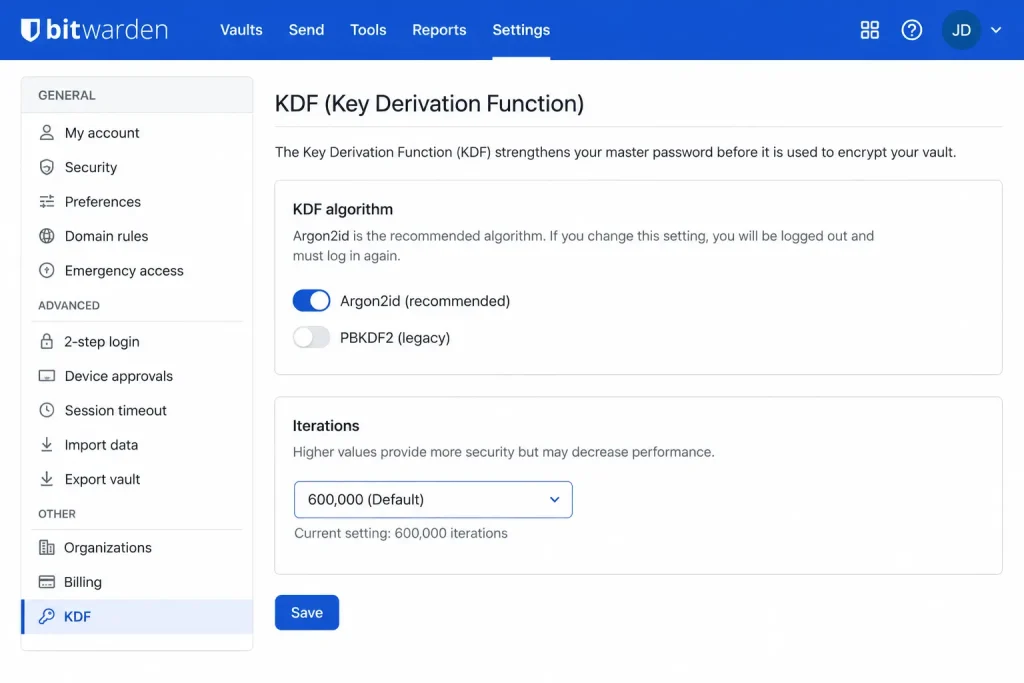
Bitwarden uses AES-256 for vault encryption and PBKDF2-SHA256 (or Argon2id, if you enable it) for key derivation. Your master password never leaves your device — only the encrypted vault blob gets synced to Bitwarden’s servers.
The Argon2id option is important. PBKDF2 is fine, but Argon2id is more resistant to GPU-based brute force attacks. It’s not enabled by default, which is a mild complaint I have — you have to know to go looking for it in account settings.
Bitwarden has been audited by third parties multiple times. The 2023 audit by Cure53 is probably the most cited. From what I’ve seen, the results were generally good with a few low-severity findings that were addressed. That audit history matters. It means real security researchers have poked at the code.
Proton Pass
Proton Pass uses AES-256-GCM with Argon2 for key derivation. Proton’s broader encryption story is built on end-to-end encryption across their product suite, and Pass fits into that architecture.
Proton Pass is newer — it launched publicly in 2023 — and has fewer completed audits at this point. Proton published a security audit from Cure53 in 2024. It was mostly clean. But “mostly clean, one audit done” is a shorter track record than Bitwarden’s cumulative audit history. That’s not a condemnation, it’s just math.
One thing Proton Pass does that Bitwarden doesn’t out of the box: it builds in SimpleLogin-style email alias generation directly into the vault. You can create a new alias on the fly when saving a login. That’s a real privacy win and something I actually use constantly now.
Comparison Table
| Feature | Bitwarden | Proton Pass |
|---|---|---|
| Encryption | AES-256 + Argon2id (opt-in) | AES-256-GCM + Argon2 |
| Open source | Yes (full stack) | Yes |
| Third-party audits | Multiple (2018, 2020, 2022, 2023) | 1 completed (2024) |
| Self-hosting | Yes | No |
| Email aliases | No (third-party only) | Yes, built-in |
| Hardware key (TOTP/2FA) | TOTP, YubiKey (premium) | TOTP, hardware key support |
| Free tier vault size | Unlimited | Unlimited |
| Passkey support | Yes | Yes |
| Breach monitoring | Yes (premium) | Yes |
The self-hosting row is where Bitwarden pulls ahead for a specific subset of users. If you don’t want your encrypted vault on anyone’s server, you can run Vaultwarden (an unofficial but widely used Bitwarden-compatible server) on your own hardware. Proton Pass doesn’t have an equivalent option. Your vault lives on Proton’s servers, full stop.
Where Each One Has Actually Had Problems
Neither has had a vault breach. But let me be accurate here — well, sort of. Proton as a company hasn’t had a vault breach. They did have a situation in 2021 where Swiss authorities compelled them to log IP addresses for a specific user, which wasn’t a Pass issue but does speak to the “Proton is immune to legal requests” reputation not being entirely accurate. Worth knowing.
Bitwarden had a security researcher flag a flaw in its autofill behavior in 2023 — under specific conditions, autofill could be triggered on iframes from different domains. It was patched, but it existed. That’s not a reason to panic, but it’s a reason to keep auto-fill settings conservative and always verify what URL you’re on.
Step-by-Step: Hardening Each Password Manager After Setup
These aren’t install guides. Both apps are easy to set up. These are the things you should do after you’re in, because the defaults aren’t always the most secure configuration.
Bitwarden Hardening
Step 1: Switch to Argon2id
Go to Account Settings → Security → Keys. Change the KDF algorithm from PBKDF2 to Argon2id. Set the memory to at least 64 MB and iterations to 3. This makes brute-force attacks on your master password significantly harder if your vault is ever exposed.
Step 2: Enable 2FA with a hardware key or TOTP app
Don’t rely solely on your master password. Bitwarden supports TOTP-based 2FA on the free tier. Hardware keys (YubiKey, etc.) require a premium account. Use one of them.
Step 3: Review your vault timeout and clipboard settings
Set your vault to lock after a short idle period — 5 minutes is reasonable on desktop. Under Options, disable “Clear Clipboard” delay or set it to 10 seconds. Passwords sitting in clipboard memory is a real attack surface people ignore.
[Image: Screenshot of Bitwarden desktop app showing vault timeout and clipboard settings]
Step 4: Turn off URI match detection for suspicious domains
Under each item, you can set how Bitwarden matches URLs. Change the default match setting from “Base domain” to “Exact” for high-value accounts (banking, email). This makes the autofill iframe issue mentioned above irrelevant for your most sensitive logins.
Proton Pass Hardening
Step 1: Enable extra password / PIN lock
In the mobile app, this is under Settings → Security. Set a PIN or biometric lock that’s separate from your Proton account password. This matters if your device is compromised.
Step 2: Set up 2FA on your Proton account, not just Pass
Proton Pass security is partly dependent on your Proton account security. If someone gets into your Proton account, they can access Pass. Two-factor on the account level is non-negotiable.
Step 3: Use the alias feature by default for new signups
Every time you create a new account somewhere, use Pass’s built-in alias generator. This decouples your real email from new services and makes credential stuffing attacks from breached databases much less effective.
What Actually Worked For Me
I spent about three months trying to move completely to Proton Pass after being a Bitwarden user since around 2020. The migration itself was fine — Pass imports Bitwarden CSV exports cleanly.
The issues came up in edge cases. Proton Pass’s browser extension would occasionally fail to detect login fields on less common sites, especially anything with a custom JavaScript-rendered form. Bitwarden wasn’t perfect at this either, but it handled more cases correctly. I ended up keeping Bitwarden active on desktop and using Proton Pass primarily on mobile, which is an annoying split but honestly not that different from how I was using things before.
The thing that actually convinced me Proton Pass was worth keeping: the email alias integration. I was using SimpleLogin separately before, and having it baked into the password manager — so alias creation and credential saving happen in one action — is genuinely useful. Not a sales pitch, just accurate.
I tried convincing myself the audit gap didn’t matter because “Proton is a trustworthy company.” That’s not actually how security works. Company reputation is not a substitute for peer-reviewed code. I still keep Bitwarden for my most sensitive logins specifically because of its longer audit history.
Advanced Security Considerations
For Self-Hosters: Vaultwarden vs Official Bitwarden Server
If you’re running your own Bitwarden instance, you’re almost certainly running Vaultwarden — it’s lighter and supports the full Bitwarden client API. The security model shifts when you self-host: now your server is the attack surface, not Bitwarden’s. That means you’re responsible for keeping it patched, TLS configured correctly, backups encrypted, and not accidentally exposing the admin panel to the internet.
From what I’ve seen in forums, the most common self-host security failure isn’t in Vaultwarden itself — it’s misconfigured reverse proxy setups that expose the admin token endpoint. If you’re going this route, lock down the /admin path to your local network only.
Proton Pass and the Proton Account Dependency
One thing users overlook: Proton Pass is more tightly coupled to your Proton account than Bitwarden is to its account system. If your Proton account gets locked, suspended, or inaccessible (forgotten 2FA backup codes, for example), your Pass vault goes with it. Bitwarden lets you export your vault without being logged in to the web app, as long as you have the desktop client open and unlocked.
Keep encrypted export backups of both vaults on a schedule. Not 100% sure why more people don’t talk about this, but losing vault access is a real scenario and it’s almost always the user’s fault, not the app’s.
Prevention and Maintenance Habits That Actually Help
- Export your vault monthly, encrypt it with a strong passphrase, and store it somewhere offline (external drive, encrypted USB). This takes five minutes.
- Audit unused logins once a quarter. Both apps show weak or reused passwords. Fix them. The weak password report is more useful than the breach monitoring in practice.
- Don’t use the same master password you’ve used anywhere else. Obvious but worth saying.
- Review connected devices periodically. Bitwarden’s web vault shows active sessions. Proton Pass shows this in account settings. If you see a device you don’t recognize, revoke it and rotate your master password.
- Be conservative with browser extension permissions. Both extensions request broad page access. That’s how they work. But installing additional browser extensions that can interact with page content increases your attack surface — not a Pass/Bitwarden issue specifically, just worth keeping in mind.
FAQ
Is Proton Pass actually end-to-end encrypted?
Yes. Your vault is encrypted client-side before it reaches Proton’s servers. Proton can’t read your passwords. That said, “end-to-end encrypted” gets thrown around loosely — what matters is whether the implementation has been independently audited, and for Proton Pass, that audit history is newer and thinner than Bitwarden’s.
Can I use both at the same time?
You can, and honestly that’s what I do. Different password managers for different threat levels sounds paranoid but it’s not uncommon in security-conscious setups. It does complicate keeping things updated across both.
Which is better for teams?
Bitwarden. The Organizations feature, granular permissions, and longer track record with enterprise deployments make it the clearer choice for anything beyond personal use. Proton Pass for Business exists but it’s newer and less battle-tested for shared vault management.
Does either one support passkeys?
Both do now. Passkey support was added to Bitwarden in 2023 and to Proton Pass in 2024. Your mileage may vary on site compatibility — some sites are still finicky about third-party passkey providers versus browser-native ones.
What happens to my Proton Pass data if Proton shuts down?
You can export your vault as a CSV. It’s readable by other password managers. The email aliases are a different problem — if Proton (or SimpleLogin, which they own) went away, those alias addresses would stop working and you’d need to update all those accounts. Worth factoring into your decision if you lean heavily on aliases.
Is Bitwarden’s free tier actually good or is it a trap?
It’s genuinely good for individual use. Unlimited vault items, unlimited devices, basic 2FA — all free. The paid tier ($10/year) adds Argon2id KDF, hardware key 2FA, encrypted file attachments, and breach monitoring. The free tier isn’t a trap. The paid tier is just worth it.
Editor’s Opinion
Bitwarden wins on trust and track record. That’s just where it is. Proton Pass is catching up and the alias feature is legitimately great — I actually changed my habits because of it. But if someone told me they were picking one manager and only one, I’d tell them Bitwarden. It’s been poked at more, self-hosting is possible, and the security defaults (once you flip to Argon2id) are solid. Proton Pass feels like it’ll get there. It’s not there yet.